


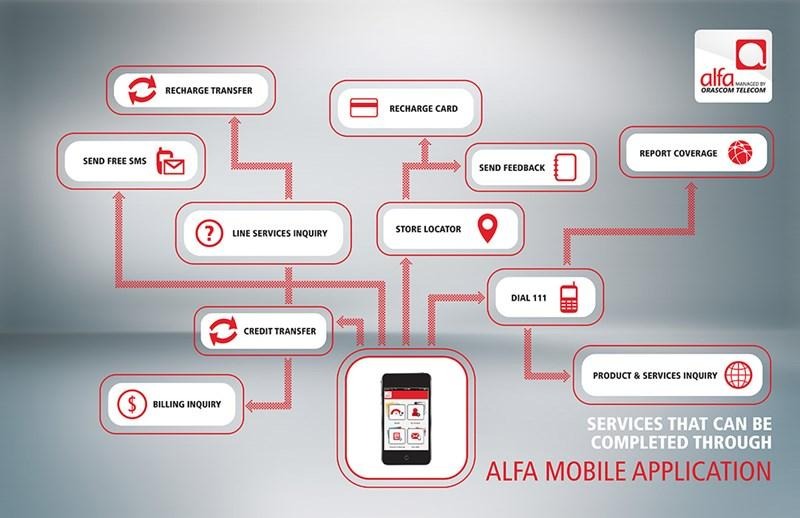
Paying your Alfa bill has become simpler with the digital services offered by Alfa to subscribers in Lebanon. Users can now track their accounts and settle their phone bills through the Alfa Mobile app without visiting Alfa stores. The app also allows users to manage multiple accounts from one place, facilitating the monitoring of bills and various services.
Alfa also provides several other payment methods, including electronic payments, credit cards, company stores, authorized agents, and certain money transfer companies. Subscribers can choose the most suitable payment method based on their line type and preferred payment method.
How to Pay Your Alfa Bill via Alfa Mobile App?

You can pay your phone bill through the Alfa Mobile app by following simple steps.
Start by downloading the app and logging into your account. Then, navigate to the account linked to the Alfa line you want to pay the bill for.
Next, view the current bill amount and choose the bill payment option. Then, enter the required credit card information to complete the process.
Alfa officially confirms that its app enables bill payment using a credit card, along with the ability to activate the auto-payment feature.
Detailed Steps to Pay Your Alfa Bill
The payment method via the app can be summarized in the following steps:
- Open the Alfa Mobile app.
- Log into your account.
- Select the desired Alfa number.
- Go to the bill or account section.
- Check the due amount.
- Choose the bill payment option.
- Enter the credit card information.
- Complete the payment process.
- Keep the transaction confirmation for future reference.
In case you have multiple Alfa accounts, the app allows you to switch between and manage these accounts without needing to log in each time.
Is Paying Alfa Bill via the App Free?
According to the official Alfa website, the app allows bill payments using a credit card. The company indicates that payments through Alfa stores are free of additional charges, but any card or payment service-related fees, if applicable, may vary depending on the payment method and card issuer's terms. Therefore, it's advisable to review transaction details before confirming.
Activating Auto-Payment for Alfa Bills
Alfa Mobile provides the ability to activate auto-payment for bills. This feature is beneficial for those who want to pay their bill regularly without having to manually perform the transaction each billing cycle.
Other Ways to Pay Alfa Bill
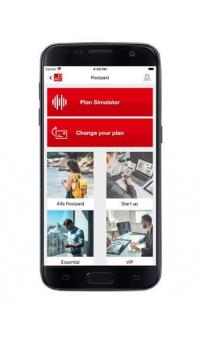
Paying your Alfa bill is not limited to the app. The company offers multiple methods for subscribers.
- Online payment through the Internet.
- Payment via Alfa Mobile app.
- Cash payments in Alfa stores.
- Payments at authorized agents.
- Payments through some money transfer companies.
- Payments through banks using available services.
- Credit card payments in Alfa stores.
Paying Alfa Bill Online
Subscribers can use the electronic payment service via Alfa's website, which provides a dedicated page for payment and recharge. The service supports payment cards accepted by Alfa and offers a secure electronic payment system for completing the process.
Checking Alfa Bill Amount
Subscribers can track their bill amount through Alfa Mobile. There are also other methods for bill inquiry available for monthly line subscribers, such as using the Alfa Mobile app, calling 114, or sending the word Bill to 114 according to the official information provided by the company.
When Should You Pay the Alfa Bill?
Payment dates vary depending on the billing cycle associated with the line. Alfa explains that it has several billing cycles, each with a specific payment date. For instance, a billing cycle starting on the eighth day is due on the twenty-third day, while the fifteenth-day cycle is due on the thirtieth day.
What Happens if You Delay Alfa Bill Payment?
Alfa explains that the monthly line undergoes different stages if the bill is not paid on time. Official information indicates that outgoing calls may be blocked after the due date, the line may be suspended after additional delay, and the line may be canceled if suspension persists for a long period according to the company’s terms.
Can You Pay Alfa Bill via Whish Money?
Yes, Alfa mentions Whish Money among the available payment methods for subscribers, providing an additional option for those who prefer using digital financial services over cash payment at Alfa stores.
Paying Alfa Fixed Line Bill
Alfa also provides services for fixed lines, including the Bayti service. Subscribers can pay their Bayti bill through several means, including Alfa stores, authorized agents, OMT, Whish Money, and certain banks. Credit card pay at Alfa stores is available at no additional cost as well, so it is preferable to ensure the service and account type before choosing a payment method.
What to Do If Payment Fails?
If the electronic payment does not complete successfully, first check the card details and if there is sufficient balance or credit limit to complete the transaction.
- Use the official Alfa app or website.
- Ensure the line and account numbers are correct before payment.
- Check the bill amount before confirming the process.
- Do not share card details or verification codes with anyone.
- Keep a success notification for reference.
- Make sure to update the Alfa Mobile app to the latest version.
- If you activated auto-payment, monitor deductions and bills regularly.
What’s the Best Method to Pay Alfa Bill?
The best method depends on the subscriber's needs. If speed is a priority and you want to avoid store visits, Alfa Mobile and electronic payments suit you best. For those who prefer cash payments, Alfa stores or authorized agents are available. If you rely on digital financial services, options like Whish Money and OMT are also available for certain line types.
Conclusion
Paying your Alfa bill has become more accessible thanks to the digital services provided by the company. The Alfa Mobile app allows subscribers to monitor their accounts and pay bills using a credit card, with the option to enable auto-payment. Alfa offers other options, including electronic payments, Alfa stores, authorized agents, some banks, and financial service companies. It is always advised to use official channels and verify the bill amount and due date before completing the payment process.
See Also