


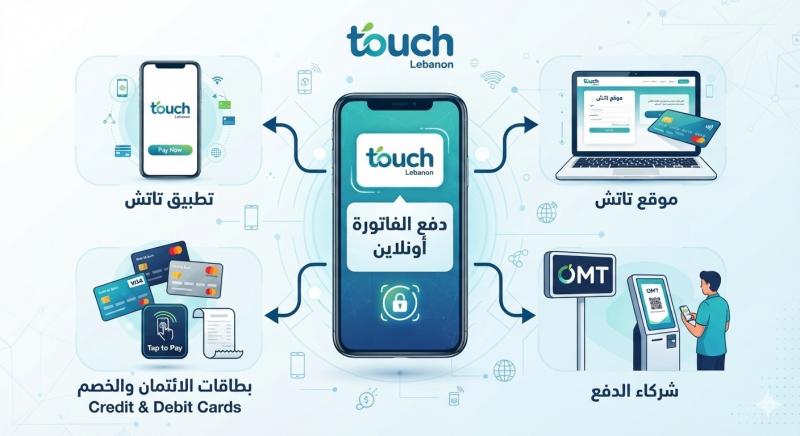
Paying the Touch bill online in Lebanon is now a time-saving alternative for subscribers, eliminating the need for visits to service centers. The company Touch offers the possibility to settle postpaid bills electronically via its website and digital payment services, including the Touch self-care app. Additionally, bills can now be paid using the My OMT app with the OMT Visa card.
These electronic payment services are part of various available channels for Touch postpaid subscribers, alongside payments through Touch stores and other authorized payment channels, as well as direct bank account deductions. Touch clarifies that subscribers can access the bill payment option through their accounts on the website or app.
How to Pay Your Touch Bill Online via Touch Website

Touch allows postpaid subscribers to electronically pay their bills through the Bill e-Pay service on its platform. According to the information on the Touch website, payment can be made by accessing My Touch, navigating to the usage section, and selecting to pay the bill.
Follow these steps:
- Visit the Touch website.
- Log in to your My Touch account.
- Go to the My Usage section.
- Find the Pay my bill option.
- Review the bill amount due.
- Follow the electronic payment steps displayed on the screen.
- Complete the process and keep the payment confirmation as needed.
Through the My Touch account, Touch provides the ability to monitor usage and manage services, in addition to bill payment.
Official Touch Site and Electronic Payment Service
Paying Your Touch Bill via Touch App
Postpaid subscribers can also utilize the Touch self-care app to manage their line, track usage, and pay the bill.
Touch explains that payment through the app starts from the Current Balance and selecting Pay My Bill to finalize the electronic payment process.
Steps to Pay via the Touch App:
After opening the app and signing in:
- Go to the dashboard.
- Select Current Balance.
- Click Pay My Bill.
- Review the bill amount.
- Complete the available payment steps.
- Retain the confirmation after payment completion.
The app provides a practical option for subscribers who wish to track their bills and usage from their phone instead of logging into the website each time.
Paying Your Touch Bill via My OMT App
OMT has announced the activation of the Bill Payment service on the My OMT app, allowing Touch postpaid subscribers to settle their bills through the app using the OMT Visa card.
For payment via My OMT, users need to download the latest app version from the app store, then use the available bill payment service within it.
Details on Touch via My OMT Service
Steps to Pay via My OMT
The process can be summarized as follows:
- Download the latest My OMT app version.
- Open the app and log in.
- Select the Bill Payment service.
- Choose the Touch bill.
- Enter the required information.
- Use the OMT Visa card to complete the payment.
- Ensure the transaction success is displayed and keep the confirmation.
OMT officially confirms that Touch postpaid bill payments are now available through the My OMT app using the OMT Visa card.
What Other Ways Are There to Pay a Touch Bill?
Paying Touch bills is not limited to online methods. The company offers a range of payment channels that include:
- Bill e-Pay electronic payment.
- Direct deduction from a bank account.
- Touch stores.
- Authorized payment channels.
- Payments via ATMs.
- Other approved payment services.
OMT also states that it provides payment for Touch postpaid bills through OMT centers, along with its digital payment channels.
Can You Pay a Touch Bill Without Visiting a Service Center?
Yes, if you have an account or app that supports electronic payment services, you can pay the bill remotely.
Touch provides payment through My Touch and the Bill e-Pay service. The Touch self-care app can also be used. OMT offers an additional option via the My OMT app using an OMT Visa card.
This means subscribers can choose the method that suits them best, whether through the website or mobile phone.
How Do I Know the Amount Due for My Touch Bill?
Subscribers can track their bill and usage through the My Touch account or Touch self-care app.
Touch explains that through their electronic account, subscribers can monitor line usage and services, with billing services detailing the amount due and billing cycle.
The company also sends a notification to the subscriber when the bill is issued and recommends paying the amount within the specified timeframe to avoid service disruptions.
What Happens If You Delay Paying Your Touch Bill?
It is crucial not to ignore the bill after it is issued, as delayed payment can result in line usage restrictions.
According to Touch, if the bill is not paid, the line moves to a Barred status for ten days, allowing incoming calls while outgoing ones stop. It then moves to a suspension phase for 20 days if dues remain unpaid. Further stages may lead to line cancellation if settlements are not made.
Touch also notes the existence of fees for reconnecting the line after certain suspension or pre-cancellation phases.
Therefore, it is advisable to pay the bill on time and not wait until service is restricted.
How Can I Track My Touch Line Usage Before the Bill Is Issued?
Touch offers several ways to monitor usage, including the Touch self-care app and My Touch account.
The company also indicates subscribers can call 114 or send an SMS with the word Bill to 114 to obtain usage information, according to channels and fees determined by the company.
Regular usage monitoring helps identify services or additional uses that may impact the monthly billing amount.
Can I Receive an Electronic Copy of My Touch Bill?
Yes, Touch offers the benefit of electronic bill notifications. Subscribers can also log in to their account to track bill details and usage. The company also mentions using the e-bill notification service to receive electronic alerts for bills.
It is advisable to retain payment confirmations or a copy of transaction details, especially when paying the bill electronically.
Important Tips for Paying Touch Bill Online
Before completing the payment process, consider these points:
- Use the official website or app instead of unreliable links.
- Ensure logging into the correct Touch account.
- Verify the bill amount before confirming payment.
- Do not share passwords or verification codes with anyone.
- Keep the transaction confirmation after payment.
- If payment does not appear immediately, do not repeat the process before verifying the status of the first transaction.
- Keep all apps updated to the latest version.
- Do not wait until the service cut-off date to pay the bill.
What Is the Difference Between Touch Postpaid and Touch Prepaid?
The Postpaid system differs from the Prepaid system in usage calculation and payment methods.
In the postpaid plan, subscribers receive a monthly bill covering subscription fees, usage, and additional services. Touch specifies that bills are issued monthly according to the line's billing cycle.
In contrast, the prepaid line depends on recharging credit and using it according to available services and packages.
Thus, the Touch Bill Online Payment service discussed in this guide specifically pertains to postpaid subscribers.
Conclusion
Paying Touch bills online in Lebanon has become an easy option for subscribers wishing to settle bills from home or on the go. Touch facilitates payment via its website using My Touch and the Bill e-Pay service, along with the ability to pay via the Touch self-care app through the Pay My Bill option.
Furthermore, Touch postpaid subscribers can use the My OMT app to pay the bill via the Bill Payment service using the OMT Visa card, as officially announced by OMT.
Consequently, choosing the method depends on the subscriber's preferred route, ensuring payment success and confirmation retention, and avoiding delayed payments to prevent service restrictions.
See Also
Alpha Lebanon Complaints Number: How to Contact Customer Service?