


Paying your internet bill online in Lebanon has become a convenient option for subscribers who wish to settle their dues from home without the necessity of visiting sales centers or payment points. Various electronic methods are available, differing based on the internet provider and service supplier. These methods include official platforms, payment apps, e-wallets, and digital banking services.
Ogero is one of the primary entities whose services can be managed online via its official website and the My Ogero service. Some local payment apps also offer services for settling internet bills and digital subscriptions. Therefore, the most suitable option depends on the company you are associated with and the payment method available for your account.
How to Pay Ogero Bills Online
Ogero subscribers can use the institution's electronic services to manage their accounts and services.
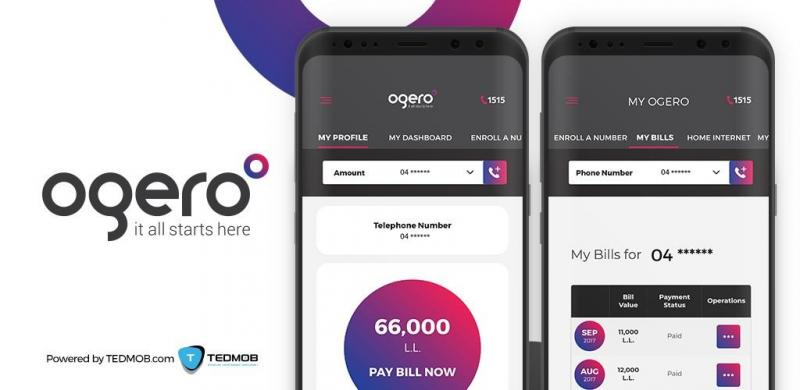
Ogero offers the My Ogero service, allowing subscribers to create an account and register their fixed-line number. The official FAQs explain that account creation is done through Ogero's website, then registering the number using the line number and issue date found on the bill or by using the 1515 service.
After logging into the account, the subscriber can monitor services linked to their number and use the available electronic services.
Steps to Create a My Ogero Account
If you don't have a My Ogero account, Ogero outlines the following basic steps:
- Visit the official Ogero website.
- Select My Ogero.
- Click on Create Account.
- Enter the required information.
- Open your email and confirm the account via the message sent from Ogero.
- Log in to the account.
- Select Enroll A Number.
- Register the fixed-line number and the issue date found on the bill.
Ogero states that the issue date of the bill or line information can be used to complete the number registration in the account.
Does the Internet Bill Appear Within the Phone Bill?
Regarding Ogero's internet services, the official FAQs explain that internet subscriptions and usage appear within the phone bill and are issued monthly.
This means the subscriber needs to monitor their main bill to know the due amount, rather than considering the internet as a separate bill in all cases.
Payment via Whish Money
Whish Money is one of the digital options available for paying various bills and services in Lebanon.
Whish officially clarifies that the app allows the payment of bills via the platform and mentions in the FAQs the ability to pay internet subscriptions and manage internet packages through the app with instant payment and renewal.
If your internet provider is supported within the Whish app, you can select your internet service from the list of bills and follow the payment steps shown in the app.
The available services differ based on the provider, so it's advisable to ensure the company you deal with appears in the app before completing the transaction.
Can Ogero Bills Be Paid via Whish?
Whish currently supports multiple bill payment services, and the official fee page indicates a dedicated service for Ogero bills with a specified service charge for this process.
Users can check the Ogero service within the Whish app and select it to pay the bill according to the available options at the time of payment.
It's recommended to review the charge amount displayed in the app before confirming the transaction since electronic service fees might vary depending on the operation type.
Payment via Banking Apps
Electronic banking services can also be used when your bank offers bill payment services.
The names of sections and access methods vary from bank to bank, so you might find the service under names such as:
- Bill Payments.
- دفع الفواتير.
- Business Services.
- Payments.
- Telecom & Utilities.
Before confirming the transaction, ensure that you select the correct entity and enter the required account or phone number, then review the amount before completing the payment.
Paying Internet Bills to a Private Service Provider
If you are subscribed to a private internet company, don't necessarily rely on the Ogero method.
The steps differ from provider to provider and might include:
- The company's website.
- The company's app.
- An electronic payment gateway.
- A bank card.
- E-wallet applications.
- Bank transfer.
- Approved payment points.
Therefore, it's best to visit the official website of your internet provider and look for a Payment or Pay Your Bill section or contact customer service to find out about the approved payment method.
What Do You Need When Paying an Internet Bill Electronically?
The required data might vary depending on the platform, but it's useful to prepare:
- Your phone or fixed-line number.
- Account or subscriber number.
- Bill amount if required.
- Payment card or electronic payment method.
- Email address if needed.
- Transaction reference number after payment.
For Ogero, registering the number in My Ogero is linked to the phone number and issue date on the bill.
How to Ensure the Payment Process Succeeded?
After completing the payment process, always retain the transaction receipt or reference number.
In the case of Ogero, there is an official service to verify bill payments, where you can enter the phone number, payment date, and amount paid in Lebanese Lira to verify the transaction.
This step is particularly useful if the payment doesn't immediately reflect in the account or the service remains inactive post-payment.
What to Do If You Paid the Bill but the Service Remains Inactive?
If you paid your Ogero bill and services remain blocked, the official FAQs highlight the need to contact 1515 or Ogero's social media accounts or visit the nearest sales center to investigate the issue.
Ogero also indicates that some cases of service reactivation after settling dues might require a waiting period. Therefore, keeping proof of payment handy when contacting customer service is advised.
Ogero Number for Inquiries and Malfunctions
You can contact Ogero via 1515 for inquiries and malfunctions, according to the institution's official FAQs.
Ogero also provides a general phone number +961 1 840000 and an email address ThePeople@ogero.gov.lb in its official contact information.
Tips for Paying Your Internet Bill Online
To avoid mistakes during online payment, follow these simple steps:
- Use the official website or app whenever possible.
- Verify your service provider's name before payment.
- Check your account or phone number.
- Verify the required amount.
- Do not share your password or verification code with anyone.
- Keep the payment receipt.
- Do not attempt to repave immediately if confirmation is not shown; instead, first verify the transaction status.
- Review additional fees before confirming the payment.
Is Online Payment Better Than Paying Cash?
Online payment offers great convenience, especially for those who wish to settle the bill from home or outside service center working hours.
Keeping the electronic receipt allows you to revisit transaction details if needed. Conversely, some subscribers may prefer cash payments at service centers, especially if they encounter account issues or require direct assistance.
Summary
Paying your internet bill online in Lebanon has become easier with official websites, digital service apps, e-wallets, and banking services.
For Ogero users, the My Ogero platform can be used to manage accounts and register phone numbers and track services. Meanwhile, Whish Money also offers payment services for internet bills, featuring a dedicated service for Ogero bills among its available billing services.
Subscribers using private internet companies are advised to refer to the official website or app of the service provider to learn about the endorsed electronic payment method. In all cases, make sure to keep proof of payment and verify the success of the transaction before closing the payment page.
See also:
How to Report an Internet Malfunction from Ogero? Steps and Complaint Number
Electricité Du Liban Office Number
Ogero Customer Service... Contact Numbers and Reporting Problems